Notes
[modprobe, lsmod, insmod, rmmod] List, Add, Remove Kernel Modules
listing, adding and removing Linux kernel modules with modprobe, lsmod, insmod and rmmod, and which one replaced modprobe -l
Linux
3 minutes
Building on previous lessons in this section, we will learn how to probe our kernel with the appropriate device driver and determine whether it is loaded and functioning as expected. We will also discuss how we can use the configuration of modprobe to blacklist or prevent some device drivers from loading even if the hardware is present on our system as well as why we might need to do that.
modprobe
1modprobe -l # list modules
2modprobe -r moduleName # remove modules e.g. `modprobe -r floppy`
3modprobe moduleName # insert modules e.g. `modprobe floppy`
modprobe -lworks on CentOS 6.6 and Ubuntu 12 or before.modprobe, unlikeinsmodcan add modules without specifying complete module file paths.modprobefully understands where the kernel modules are installed on the system.- When compiling our kernel, we used to be able to use
modprobeto not only insert and remove modules but also query (list) the modules that were already installed on the system (by usingmodprobe -l). modprobeis replaced bylsmodin modern systems (CentOS 7, RHEL 7, Ubuntu 13+, basically any modern distribution that has come out in late 2014, early 2015). We can still usemodprobeto remove modules though.- Modern systems are unifying the toolset into anything that lists modules or hardware or devices on your system is now part of the
lstype kernel and system management tools, likelspci(all the PCI devices that are connected),lsusb(all the USB devices that are connected), and in this caselsmodis replacingmodprobe -l. modprobestill works for adding and removing modules but we can no longer use it to list modules that are installed or available on our system.
lsmod
lsmodis what we use to look for kernel modules that are installed on our system. It tells us what modules are installed and we can grep for different modules as well. It will not tell us all of the modules that are available on our system, likemodprobe -ldid.lsmodnicely formats the info that is listed in /proc/modules- You can use the
greputility to look for particular modules, like the sound modules for example:
1lsmod | grep snd
- The
lsmodis a very basic utility for listing modules, it has no advanced options or flags. It hides the hexadecimal info (that we generally won’t care about) which is in the actual /proc/modules file. /proc/modules has the same info in a space delimited format that is read by various utilities likeinsmod,modprobe,lsmodetc.
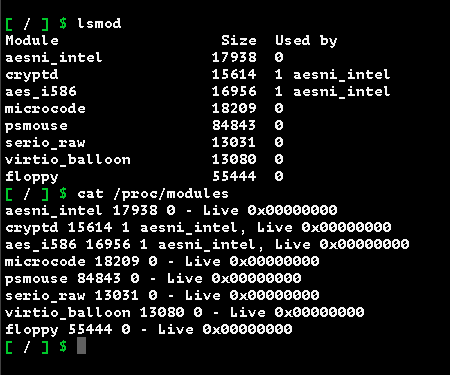
You can grep /proc/modules just like you can grep lsmod.

insmod
insmod= Insert Module.modprobe moduleNamestill works for adding modules and is simpler to use. Usemodprobe,insmodis a chore.insmodneeds a full path to the actiual binary object file that’s loaded into the kernel.insmodis not smart enough, nor is it configured by default, to look for the kernel object without passing in a full path.
An example command would be like this:
1insmod /lib/modules/Kernel-Version/kernel/drivers/block/floppy.ko
2
3insmod /lib/modules/3.13.0-40-generic/kernel/drivers/block/floppy.ko
rmmod
rmmod= Remove Modulermmoddoes not require a full path because it looks at the current kernel objects that are runningmodprobe -r moduleNamestill works for removing modules.
Misc. Commands
- check CentOS version:
cat /etc/issue - check kernel version:
uname -a