Notes
Gitflow
installing git-flow and how the master, develop, feature, release and hotfix branches work together
Git & Github
2 minutes
Gitflow
 1# macOS
 2brew install git-flow
 3
 4# Linux
 5sudo apt install git-flow
 6
 7# Wndows
 8# https://github.com/nvie/gitflow/wiki/Windows
 9
10# Initiate Gitflow inside your repo
11git flow init
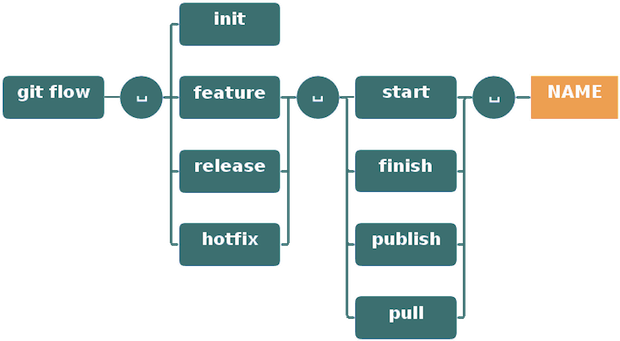
Main and supporting branches:
- master
- develop
- feature/
- hotfix/
- release/
Master branch master/
This is the production branch for live, released code. develop gets merged into master whenever you release. Do not work on this branch directly, your commits will always come via develop or hotfix. The master and develop branches are long-running branches and you do not commit directly into them.
Development branch develop/
This is the main branch for continuous development. All feature branches get merged into develop when they are finished
Feature branches feature/
Every feature gets its own branch. Start a feature branch with
1git flow feature start feature_name
When done, close the feature branch with
1git flow feature finish feature_name
When you finish a feature banch, it gets merged into develop. The finished feature branch itself is deleted.
Release branches release/
Release branches are created off of develop, and merge into master as well as back-merge all changes into develop.
1git flow release start v3.4.5
2
3git flow release finish v3.4.5
Start a release branch, updated the CHANGELOG.md with details of the release and finish it.
Hotfix branches hotfix/
Maintenance or “hotfix” branches are used to quickly patch production releases.
- Hotfix branches are the only branches that are based off of
master - They get a release number just like Release branches
- They get merged into
masterand back-merged intodevelop
1git flow hotfix start v3.4.6
2
3git flow hotfix finish v3.4.6
Removing deleted Gitflow feature branches from remote
1# if you are finishing the branch, use -F
2git flow feature finish foo -F
3
4# if feature is finished and changes are already pushed
5git push origin :feature/foo
6
7# delete remote manually
8git push origin --delete feature/foo
- the
-Ffetches the remote before finishing the feature git push origin serverfix:serverfix, does the same thing — it says, “Take my serverfix and make it the remote’s serverfix.”--deletelet’s you delete a remote branch