Notes
Install Armbian on Orange Pi+ 2
flashing Armbian to a microSD card for my Orange Pi Plus 2 with USBImager, moving the install to eMMC, backing it up and fixing what broke after.
Armbian
7 minutes
STATUS: DRAFT
Install Armbian on a microSD card
Download Xfce desktop (Jammy) or cli version (Bookworm) from the archive
Balena Etcher kept giving me errors.
Download the .img.xz file.
On macOS, i got an error saying "USBImager.app" is damaged and can't be opened.. Could not run it even after clearing the quarantine tag /usr/bin/xattr -crv /Applications/USBImager.app. In the end the solution was to run it from the Terminal with sudo
1sudo /Applications/USBImager.app/Contents/MacOS/usbimager -v
Sudo runs it as root (so there should be no permission issues) and -v enables verbose mode where USBImager prints details to stdout. Those messages might shed some light on the issue. (However this sounds like a Mac AppKit issue rather than an USBImager issue at first.)
Writing Image File to Device ref
- select an image by clicking on “…” in the 1st row
- select a device by clicking on the 3rd row
- click on the first button (Write) in the 2nd row
On Allwinner devices after switching to boot from NAND or eMMC clearing the boot loader signature on the SD card is recommended:
1dd if=/dev/zero of=/dev/mmcblkN bs=1024 seek=8 count=1
(replace /dev/mmcblkN with the correct device node – in case you run this directly after armbian-install without a reboot in between then it’s /dev/mmcblk0). When booting from eMMC to get SD cards auto-detected on Allwinner legacy images please consider changing mmc0’s sdc_detmode from 3 to 1 in the board’s fex file (see here for details).
How to install to NAND?
While in theory writing to NAND should still be possible using armbian-installer, this requires running a very old 3.4.y kernel which Armbian has dropped support for several years ago. Therefore this feature is to be considered as deprecated and no support for either 3.4.y systems or NAND installations will be provided.
Backup install on eMMC to SD Card
$(uname -n)-$(date +%Y%m%d)-$(uname -r).img.gzwill outputorangepiplus-20250226-6.1.63-current-sunxi.img.gzls /dev/mmcblk*boot0 | cut -c1-12will give you the eMMC Node (e.g./dev/emmcblk2)
1LOCATION="/media/amna/794B-3DB2"
2sudo dd bs=4M status=progress if=$(ls /dev/mmcblk*boot0 | cut -c1-12) | gzip > ${LOCATION}/$(uname -n)-$(date +%Y%m%d)-$(uname -r).img.gz
Move install to eMMC
http://www.orangepi.org/orangepiwiki/index.php/Orange_Pi_5_Plus#How_to_burn_Linux_image_to_eMMC
Find the parameters for if (input file) and of (output file)
Confirm what device is mounted with df -h /, lsblk -o NAME,FSTYPE,MOUNTPOINT,SIZE or cat /proc/cmdline | grep root=
1sudo /usr/sbin/nand-sata-install
2
3# reboot, then verify
4sudo fdisk -l
1# confirm the device node of eMMC
2# for example: /dev/mmcblk1
3ls /dev/mmcblk*boot0 | cut -c1-12 # gave me /dev/mmcblk2
If Orange Pi is booting from SD card then the card will be mmcblk0 and eMMC will be mmcblk1. (It has to do with the hardware wiring and the order in which they’re detected during boot)
In Android / Linux kernel drivers
mmcblkis the naming convention for eMMC flash storage block devices.mmcblk0corresponds to internal memory. partitions will be listed asmmcblk0p1,mmcblk0p2etc. If you add an SD card a new block devicemmcblk1will become available.
If you only see mmcblk0 and mmcblk2, and no mmcblk1, that is okay. It shows the device that you are booting from and not list the other one. mmcblk0 will always be the device that you’re booting from?
/dev/mmcblk*boot0 | cut -c1-12 gave me /dev/mmcblk2
1# Clear the eMMC
2# make sure you UPDATE the of= parameter to match the output of the command above
3sudo dd bs=1M if=/dev/zero of=/dev/mmcblk1 count=1000 status=progress
4
5sudo sync
1# copy from sd card to emmc
2sudo dd bs=1M if=Orangepi5plus_x.x.x_debian_bullseye_desktop_xfce_linux5.10.110.img of=/dev/mmcblk1 status=progress
3
4sudo sync
Yes, you can make a bootable USB with an Armbian image . Use “ddbr” then “b” to make a backup of the internal EMMC. The backup file will be in /ddbr of the USB device.
Restore that image file with “ddbr” then “r” to another device with same hardwares.
Backup install from eMMC
CAN NOT SEE EMMC - mmcblk1 doesn’t show. is it MOUNTED?
1mkdir /mnt/emmc
2mount /dev/mmcblk1p1 /mnt/emmc
DO THE SD CARD AND EMMC NEED TO BE THE SAME SIZE?
DO I NEED TO RUN FROM EMMC TO MAKE A BACKUP OF EMMC?
How to upgrade distribution (like Focal to Jammy or Bullseye to Bookworm)?
Fire up armbian-config to freeze your firmware packages (if not frozen already, select System and Freeze).
Then follow generic upgrade instructions specific to your userspace:
- Like for Debian: https://www.debian.org/releases/bookworm/arm64/release-notes/ch-upgrading.en.html
- Or Ubuntu: launch
do-release-upgrade
Attention: Userspaces distribution upgrades are neither tested nor supported. Therefore Armbian cannot provide support if something goes wrong.
https://www.cyberciti.biz/faq/apt-get-hold-back-packages-command/
Post install troubleshooting
Web Browser quit.
failed to execute web browser input/output error
quiet possibly because you (see it listed under Application but) don’t actually have a browser installed. Installing one should fix it.
Failed to eject
Failed to eject “XX GB Volume”.

Error ejecting /dev/sdb: Error spawning command-line ‘eject’/dev/sdb”: Failed to execute child process “eject” (No such file or directory) (g-exec-error-quark, 8).
One solution is to use the command line sudo umount /pathtoyourmountpoint. Eject is more for DVD/CD drives, which the Orange Pi does not have. If you want to eject from the file manager, you can install the missing dependency
1sudo apt install eject
Example dd commands
$(uname -n)-$(date +%Y%m%d)-$(uname -r).img.gzwill outputorangepiplus-20250226-6.1.63-current-sunxi.img.gzls /dev/mmcblk*boot0 | cut -c1-12will give you the eMMC Node (e.g./dev/emmcblk2)
1LOCATION="/media/amna/794B-3DB2"
2sudo dd bs=4M status=progress if=$(ls /dev/mmcblk*boot0 | cut -c1-12) | gzip > ${LOCATION}/$(uname -n)-emmc-backup-$(date +%Y%m%d)-$(uname -r).img.gz
3
4# example emmc device: /dev/emmcblk2
5# example filename: orangepiplus-20250226-6.1.63-current-sunxi.img.gz
1dd bs=4M if=/dev/sdb | gzip > image1-`date +%d%m%y`.img.gz
2
3# dd if=<armbian.img> of=/dev/mmcblkX
4
5sudo dd if=/media/USB/emmc_backup.img of=/dev/mmcblk1 bs=1M conv=fsync
https://gitlab.com/bztsrc/usbimager
 1# RESTORE from eMMC to SD Card
 2# create a backup image
 3sudo dd if=/dev/mmcblk1 bs=1M status=progress | xz > /media/USB/emmc_backup.img.xz
 4
 5# reset eMMC
 6# this will erase all data
 7dd if=/dev/zero of=/dev/mmcblk1
 8
 9# restore from USB to eMMC
10sudo dd if=/media/USB/emmc_backup.img of=/dev/mmcblk1 bs=1M conv=fsync
Backup internal eMMC with ddbr command
Yes, you can make a bootable USB with an Armbian image . Use “ddbr” then “b” to make a backup of the internal EMMC. The backup file will be in /ddbr of the USB device.
Restore that image file with “ddbr” then “r” to another device with same hardwares.
The backup is the emmc partition and can only be used in emmc.
When i tried to take a backup of eMMC while booting from SD card, ddbr gave me the error UNABLE TO FIND YOUR EMMC DRIVE OR YOU ALREADY RUN FROM EMMC!!!. I know I was running from SD card, and not eMMC because the operating system versions and the usernames are different on both.
1dmesg | grep mmc
look for ubootsource=
Mine was mmcblk2 when i had Armbian running from the SD Card (new) and already had it on eMMC as well (old). I was trying to backup the operating system on the eMMC before i could reset it and install on eMMC again from the SD card
Debugging Armbian
1sudo armbianmonitor -u
[sudo] password for userfoo:
System diagnosis information will now be uploaded to https://paste.armbian.com/epiyudimal
Please post the URL in the forum where you've been asked for.
1dpkg -l | egrep "armbian| linux-"
ii  armbian-bsp-cli-orangepiplus-current     23.11.1                                 armhf        Armbian CLI BSP for board 'orangepiplus' branch 'current'
ii  armbian-bsp-desktop-orangepiplus-current 23.11.1                                 armhf        Armbian bsp-desktop for release jammy, common for all desktop environments on armhf orangepiplus machines on current branch
ii  armbian-config                           23.11.1                                 all          Armbian configuration utility
ii  armbian-firmware                         23.11.1                                 all          Armbian - Linux firmware
ii  armbian-jammy-desktop-xfce               23.11.1                                 all          Armbian desktop for Ubuntu jammy xfce
ii  armbian-plymouth-theme                   23.11.1                                 all          boot animation, logger and I/O multiplexer - Armbian theme
ii  armbian-zsh                              23.11.1                                 all          Armbian improved ZShell (oh-my-zsh...)
ii  linux-base                               4.5ubuntu9                              all          Linux image base package
ii  linux-dtb-current-sunxi                  23.11.1                                 armhf        Armbian Linux current DTBs in /boot/dtb-6.1.63-current-sunxi
ii  linux-image-current-sunxi                23.11.1                                 armhf        Armbian Linux current kernel image 6.1.63-current-sunxi
ii  linux-libc-dev:armhf                     5.15.0-88.98                            armhf        Linux Kernel Headers for development
ii  linux-u-boot-orangepiplus-current        23.11.1                                 armhf        Das U-Boot for orangepiplus
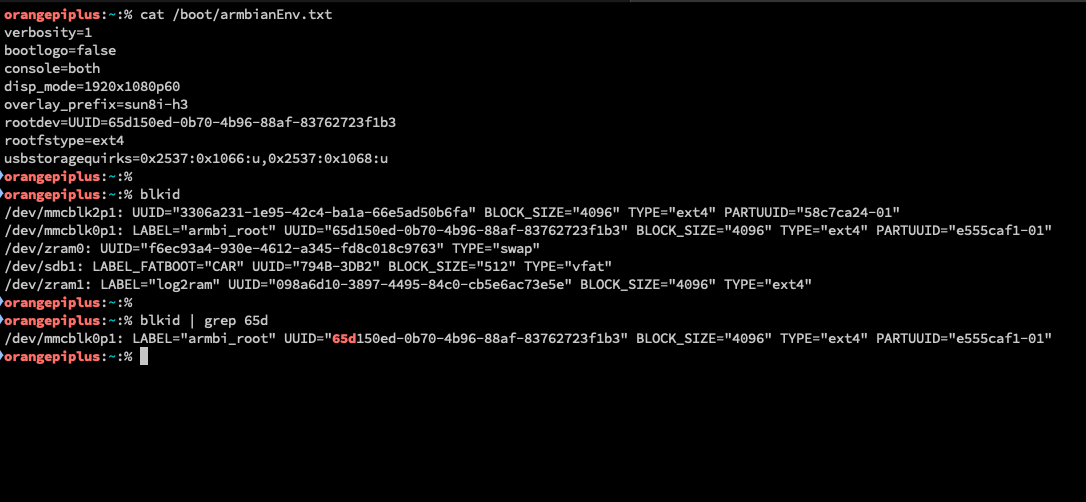
The root device is set in a file called armbianEnv.txt under /boot
1cat /boot/armbianEnv.txt
verbosity=1
bootlogo=false
console=both
disp_mode=1920x1080p60
overlay_prefix=sun8i-h3
rootdev=UUID=65d150ed-0b70-4b96-88af-83762723f1b3
rootfstype=ext4
usbstoragequirks=0x2537:0x1066:u,0x2537:0x1068:u
1blkid
/dev/mmcblk2p1: UUID="3306a231-1e95-42c4-ba1a-66e5ad50b6fa" BLOCK_SIZE="4096" TYPE="ext4" PARTUUID="58c7ca24-01"
/dev/mmcblk0p1: LABEL="armbi_root" UUID="65d150ed-0b70-4b96-88af-83762723f1b3" BLOCK_SIZE="4096" TYPE="ext4" PARTUUID="e555caf1-01"
/dev/zram0: UUID="f6ec93a4-930e-4612-a345-fd8c018c9763" TYPE="swap"
/dev/sdb1: LABEL_FATBOOT="CAR" UUID="794B-3DB2" BLOCK_SIZE="512" TYPE="vfat"
/dev/zram1: LABEL="log2ram" UUID="098a6d10-3897-4495-84c0-cb5e6ac73e5e" BLOCK_SIZE="4096" TYPE="ext4"